How to - Relink Missing Textures
Sometimes your supporting images cannot be automatically found by IronCAD or Inovate on systems. When this happens after you drag and drop a component into a scene a dialog will pop-up stating it cannot find the images being used.
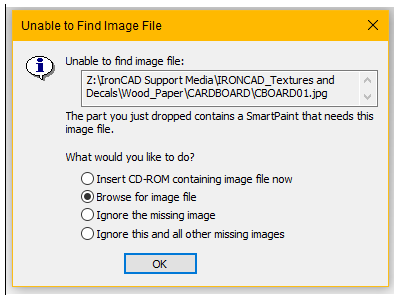
To relink...
- Select the "Browse for image file" option > OK
- Then navigate to the specifc Magna-MODELS "Textures" folder which is located in the "xxx Bin" folder of your respective Magna-MODEL and select the image that matches the filename of the missing image.
- Select the "Yes" option on the resulting pop-up so IronCAD/Inovate will know the next time to look in that specific folder.
Your Magna-MODEL is now ready for use.
Created with the Personal Edition of HelpNDoc: Make Your PDFs More Secure with Encryption and Password Protection