0-PATTERNS
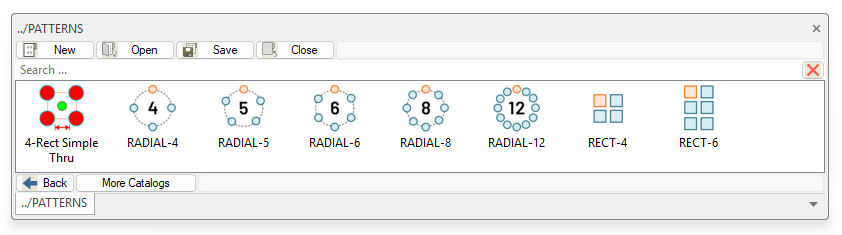
The PATTERNS sub-group is a collection of pre-defined "patterns" that can be used to add desired hole features to or other intellishapes. These work especially well when utilized in the Structured Part Design Mode.
|
4-Rect Simple Thru |
Rectangular simple thru hole Intellishape. Dimension driven feature where you can edit width, Length, and hole diameter. The feature is set by default to remove material thru the entire part. Pattern is set to be symmetrical. |
|
|
|
|
RADIAL-4 |
Pattern feature used for creating 4 hole radial patterns and can be edited thru the "Custom Hole" Edit Position option under the features tab. When used on structured part key points, the pattern will be auto-constrained by the structured part capabilities. |
|
RADIAL-5 |
Pattern feature used for creating 5 hole radial patterns and can be edited thru the "Custom Hole" Edit Position option under the features tab. When used on structured part key points, the pattern will be auto-constrained by the structured part capabilities. |
|
RADIAL-6 |
Pattern feature used for creating 6 hole radial patterns and can be edited thru the "Custom Hole" Edit Position option under the features tab. When used on structured part key points, the pattern will be auto-constrained by the structured part capabilities. |
|
RADIAL-8 |
Pattern feature used for creating 8 hole radial patterns and can be edited thru the "Custom Hole" Edit Position option under the features tab. When used on structured part key points, the pattern will be auto-constrained by the structured part capabilities. |
|
RADIAL-12 |
Pattern feature used for creating 12 hole radial patterns and can be edited thru the "Custom Hole" Edit Position option under the features tab. When used on structured part key points, the pattern will be auto-constrained by the structured part capabilities. |
|
|
|
|
RECT-4 |
Pattern feature used for creating 4 hole rectangular patterns and can be edited thru the "Custom Hole" Edit Position option under the features tab. When used on structured part key points, the pattern will be auto-constrained by the structured part capabilities. |
|
RECT-6 |
Pattern feature used for creating 4 hole rectangular patterns and can be edited thru the "Custom Hole" Edit Position option under the features tab. When used on structured part key points, the pattern will be auto-constrained by the structured part capabilities. |
Created with the Personal Edition of HelpNDoc: Generate EPub eBooks with ease